An Order Management System (OMS) is software that manages the entire order lifecycle — from the moment a customer places an order through inventory allocation, payment processing, fulfillment, shipping, delivery, and returns. It acts as the central hub connecting all sales channels, warehouses, shipping carriers, and back-office systems into one real-time operation.
If you're running an e-commerce business selling on Shopee, Lazada, TikTok Shop, or your own website, you've probably experienced the chaos of managing orders across multiple platforms. Missed orders, inventory mismatches, late shipments, and manual data entry errors — these are the problems an OMS is designed to eliminate.
This guide covers everything you need to know about OMS: how it works, core features, the difference between OMS, WMS, and ERP, real-world benefits, and how to evaluate whether your business needs one. All figures referenced below are sourced from industry reports and operational benchmarks from Southeast Asian e-commerce operations.
Table of Contents
- What is an Order Management System (OMS)?
- How an OMS Works: The Order Lifecycle
- Core Features of a Modern OMS
- OMS vs WMS vs ERP: Key Differences
- Why E-Commerce Businesses Need an OMS
- Common Use Cases by Industry
- How to Choose the Right OMS
- Signs Your Business Needs an OMS
- Frequently Asked Questions
What is an Order Management System (OMS)?
An Order Management System (OMS) is a centralized software platform that tracks, manages, and automates every stage of a customer order — from purchase to delivery and returns. It replaces fragmented tools like spreadsheets, seller center dashboards, and manual workflows with a single system that connects all your sales channels, inventory, warehouses, and shipping carriers.
For multi-channel e-commerce businesses, an OMS serves as the operational backbone. It ensures that when a customer buys a product on Shopee, the inventory is instantly updated on Lazada, TikTok Shop, and your website — preventing overselling before it happens.
The term "OMS" is sometimes used interchangeably with "order management software" or "order management platform." While these terms are broadly synonymous, an enterprise-grade OMS typically includes advanced capabilities like intelligent order routing, multi-warehouse management, and real-time analytics that go beyond basic order tracking.
Modern OMS platforms are cloud-based (SaaS), meaning they're accessible from anywhere, update automatically, and scale as your business grows — unlike legacy on-premise systems that require IT infrastructure and manual updates.
How an OMS Works: The Order Lifecycle
An OMS manages the complete journey of every order through six stages. Understanding this lifecycle is key to seeing why manual processes break down at scale.
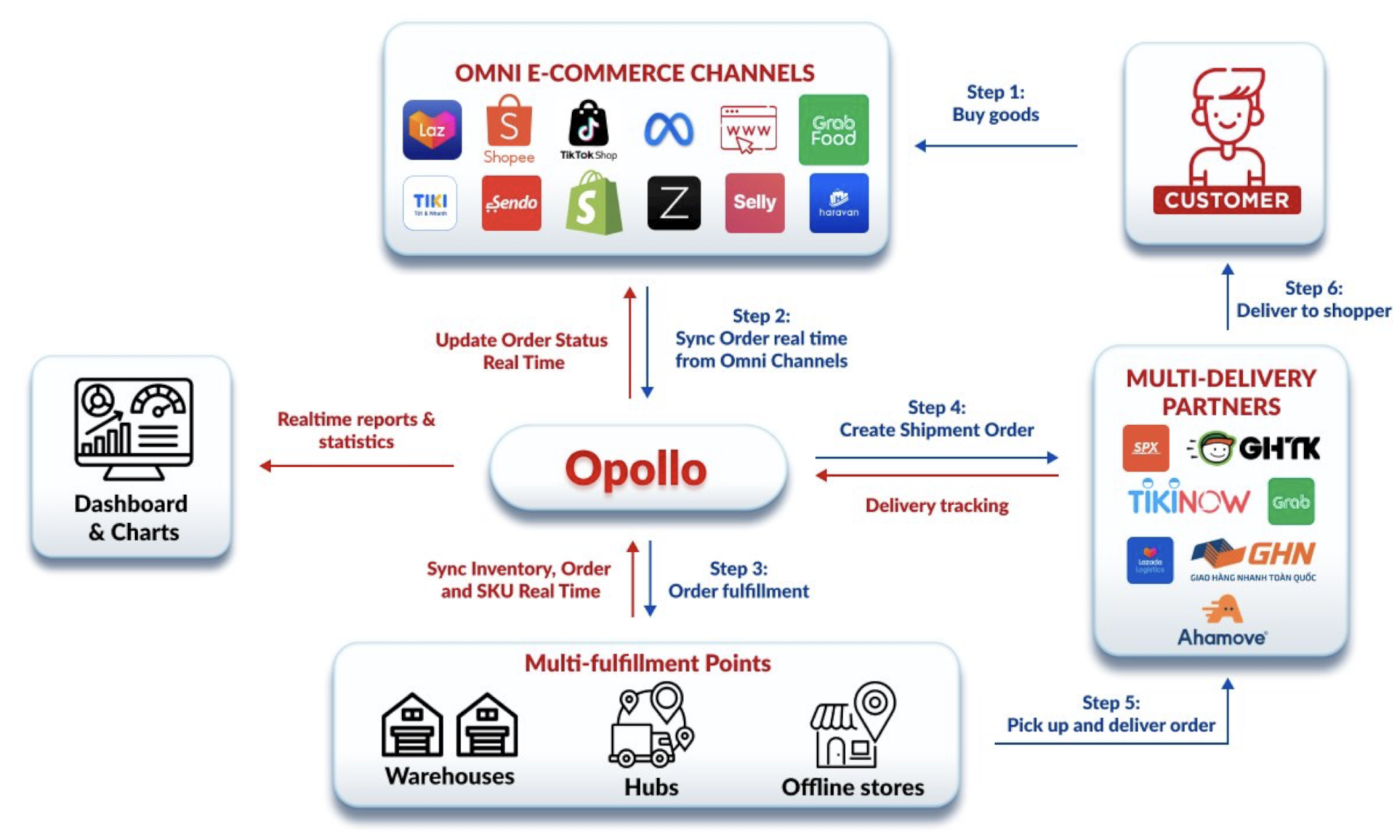
Stage 1: Order Capture
When a customer places an order on any connected channel — whether it's Shopee, Lazada, TikTok Shop, Meta, or your own website — the OMS automatically captures the order details and pulls them into a centralized dashboard. No manual data entry required.
Stage 2: Inventory Allocation
The OMS checks real-time stock levels across all connected warehouses and reserves the inventory for this order. If the same product is listed on five channels, the available quantity is instantly updated everywhere. This is how an inventory management system integrated with an OMS prevents overselling.
Stage 3: Order Routing
For businesses with multiple warehouses or fulfillment partners, the OMS determines the optimal location to fulfill the order. Routing decisions are based on factors like proximity to the customer, stock availability, carrier SLA requirements, and warehouse workload. Learn more about how automated order processing works with Shopee, TikTok Shop, and Lazada.
Stage 4: Fulfillment
Once routed, the OMS sends instructions to the warehouse team or WMS (Warehouse Management System) for picking, packing, and labeling. Shipping labels are generated automatically, and carrier handoff is coordinated without manual intervention.
Stage 5: Shipping and Tracking
The OMS pushes tracking information back to the sales channel and the customer. Status updates flow in real time — from "packed" to "shipped" to "delivered" — across all connected platforms simultaneously.
Stage 6: Returns and Post-Sale
When a customer initiates a return, the OMS manages the entire reverse logistics workflow: return authorization, carrier coordination, inventory reintegration, and refund processing. This is one of the most operationally complex stages, and a robust OMS handles it within the same system that manages outbound orders.
Core Features of a Modern OMS
Not all OMS platforms offer the same capabilities. Here are the features that define a modern, enterprise-grade order management system — and what each one means for your operations:
| Feature | What It Does | Why It Matters |
|---|---|---|
| Multi-channel order sync | Captures orders from all sales channels into one dashboard | Eliminates logging into 5+ seller centers daily |
| Real-time inventory sync | Updates stock levels across all channels within seconds of a sale | Prevents overselling and marketplace penalties |
| Intelligent order routing | Routes orders to the optimal warehouse based on rules you set | Reduces shipping costs and delivery times |
| Automated fulfillment workflows | Auto-generates pick lists, shipping labels, and carrier assignments | Cuts manual processing from hours to minutes |
| Returns management | Handles RMA, return shipping, inspection, and inventory restock | Turns a cost center into a controlled process |
| Promotion management | Creates and manages Buy X Get Y, bundles, vouchers, and pre-orders | Ensures promotions execute correctly across all channels |
| Analytics and reporting | Real-time dashboards for fulfillment rates, delivery times, SKU performance | Data-driven decisions instead of guesswork |
| CRM integration | Connects order data with customer relationship management | Unified view of customer history and interactions |
For a detailed look at how these features work together in practice, see our article on workflow automation in OMS.
OMS vs WMS vs ERP: Key Differences
One of the most common questions in e-commerce operations is whether a business needs an OMS, a WMS, an ERP, or some combination. These three systems serve fundamentally different purposes, though they work best when integrated.
| Criteria | OMS (Order Management System) | WMS (Warehouse Management System) | ERP (Enterprise Resource Planning) |
|---|---|---|---|
| Primary focus | Order lifecycle across all channels | Physical warehouse operations | Company-wide business processes |
| What it manages | Orders, inventory sync, fulfillment coordination, returns | Receiving, storage, picking, packing, shipping within a warehouse | Finance, HR, procurement, manufacturing, planning |
| Processing speed | Real-time, event-driven | Real-time within the warehouse | Batch-based, periodic updates |
| Best for | Multi-channel e-commerce brands | Warehouse operators and 3PLs | Large enterprises with complex back-office needs |
| Integration | Connects sales channels, WMS, carriers, CRM | Connects with OMS and ERP for data flow | Connects with all business departments |
| Cost | Mid-range (SaaS model) | Mid-range | High (enterprise licensing) |
In short: An OMS manages the flow of orders from purchase to delivery. A WMS manages the physical movement of goods inside the warehouse. An ERP manages the financial and administrative backbone of the business.
For a deeper comparison, read our detailed articles on OMS vs WMS differences and how OMS differs from ERP.
Most growing e-commerce businesses start with an OMS (to centralize orders and inventory) and integrate it with a WMS (for warehouse execution). An ERP is typically added later when the business reaches a scale where financial consolidation across departments becomes necessary.
Why E-Commerce Businesses Need an OMS
The need for an OMS becomes critical when a business reaches a certain level of operational complexity. Here are the specific problems an OMS solves:
1. Prevents Overselling Across Channels
When you sell the same product on Shopee, Lazada, TikTok Shop, and your website, inventory must update across all channels the moment a sale happens on any one of them. Without real-time sync, you will oversell — resulting in cancelled orders, marketplace penalties, and damaged seller ratings. An OMS with real-time inventory updates eliminates this problem entirely. Learn more about how an OMS helps brands avoid overselling.
2. Automates Manual Workflows
Without an OMS, operations teams log into each seller center separately, copy order details into spreadsheets, manually check stock, assign warehouses, print labels, and update tracking — for every single order. At 100+ orders per day, this is unsustainable. An OMS automates all of these steps. See why Excel is not enough for order management at scale.
3. Scales During Peak Seasons
Campaigns like 9.9, 11.11, and 12.12 can increase order volume by 5-10x within hours. Manual operations collapse under this pressure — leading to fulfillment delays, stockouts, and missed shipping SLAs. A robust OMS handles these spikes automatically. Read our checklist for preparing for big sales days and learn how OMS helps during peak seasons.
4. Reduces Operational Costs
By automating order processing, routing, and status updates, an OMS reduces the headcount needed for operations. Businesses typically see 30-50% reduction in manual labor costs after implementing an OMS. For a detailed breakdown, see our analysis of the ROI of OMS automation.
5. Improves Customer Experience
Faster fulfillment, accurate tracking, and smooth returns handling directly improve customer satisfaction. When the OMS powers the customer experience, brands see fewer complaints, higher repeat purchase rates, and better marketplace ratings.
Common Use Cases by Industry
OMS platforms serve different operational needs depending on the industry:
| Industry | Key OMS Use Case | Example Workflow |
|---|---|---|
| Fashion & Apparel | Flash sales, variant management, high return rates | OMS manages 50+ SKU variants across 5 channels with automated size-based routing |
| Consumer Electronics | Serial number tracking, warranty management, bundle deals | OMS links serial numbers to orders and automates warranty registration |
| FMCG & Food | Expiry date tracking, batch management, POS integration | OMS routes orders to the warehouse with the earliest-expiry stock (FEFO) |
| Beauty & Health | Sample management, bundle promotions, subscription orders | OMS auto-adds samples to qualifying orders based on cart value rules |
| E-commerce Enablers | Multi-brand management, client reporting, multi-tenant operations | OMS manages 20+ brand clients from one system with data isolation |
For enablers specifically, see our deep dive on before and after implementing an OMS in multi-channel ecommerce.
How to Choose the Right OMS
Selecting an OMS is a critical infrastructure decision. Here are the evaluation criteria that matter most for e-commerce businesses in Southeast Asia:
- Channel integrations — Does it natively connect to Shopee, Lazada, TikTok Shop, Shopify, and Meta? Native integrations are more reliable than third-party connectors.
- Real-time inventory sync — Does it use event-driven architecture (webhooks) or scheduled polling? Webhooks update in milliseconds; polling can lag by minutes.
- Multi-warehouse support — Can it route orders across multiple fulfillment locations based on configurable rules?
- Automation depth — Does it automate order routing, label generation, status updates, and notifications? Or just order capture?
- Scalability — Can it handle 10x order spikes during mega sales without performance degradation?
- Regional localization — Does it support local payment methods, carriers, tax rules, and platform APIs specific to your market?
- ERP/WMS compatibility — Can it integrate with your existing enterprise systems?
- Reporting — Does it provide real-time operational dashboards, not just historical reports?
For a complete framework, read our guide to choosing the right OMS. For a comparison of leading platforms, see best OMS software in 2025.
Signs Your Business Needs an OMS
You likely need OMS software if any of these apply to your business:
- You're selling on 2+ channels without real-time inventory sync between them
- Your operations team relies on Excel spreadsheets to track orders and stock
- You experience overselling at least once a month
- Customers receive late shipments or incorrect orders regularly
- Your team spends hours manually copying data between seller centers and internal systems
- You can't scale operations during peak seasons without hiring temporary staff
- You have no real-time visibility into order status, fulfillment rates, or inventory levels
- You're processing 200+ orders per day and the error rate is climbing
If three or more of these describe your situation, the cost of not having an OMS — in errors, labor, and lost customer trust — almost certainly exceeds the cost of implementing one. For a deeper assessment, read 8 signs your brand needs an OMS.
Opollo OMS: Built for Southeast Asian E-Commerce
Opollo is an omnichannel order management system developed by OnPoint, designed specifically for the fast-moving, multi-platform landscape of Southeast Asian e-commerce. While global OMS platforms like NetSuite, Manhattan, and Salesforce serve enterprise retailers in Western markets, Opollo is purpose-built for the regional realities of selling on Shopee, Lazada, TikTok Shop, and local platforms.
Key differentiators include native marketplace integrations with Southeast Asian platforms, real-time inventory synchronization across all channels, integrated product management, promotion management, and customer relationship management (CRM) — all within a single platform. The system currently supports 500+ e-commerce stores and processes millions of orders across the region.
To see how Opollo can streamline your operations, request a demo or explore our key features.
Frequently Asked Questions
What is an OMS in simple terms?
An OMS (Order Management System) is software that manages every step of a customer order — from purchase to delivery and returns — across all your sales channels in one system. It replaces manual processes like spreadsheets and separate seller center dashboards with automated workflows.
What is the difference between OMS and WMS?
An OMS manages the order lifecycle across all sales channels (order capture, inventory sync, fulfillment coordination, returns). A WMS manages physical warehouse operations (receiving, storage, picking, packing, shipping). They work best together — the OMS tells the WMS what to fulfill, and the WMS reports back when it's done. See our full comparison: OMS vs WMS.
What is the difference between OMS and ERP?
An ERP handles broad business functions (finance, HR, procurement) using batch processing. An OMS is purpose-built for e-commerce order workflows and operates in real time. Most growing e-commerce businesses need an OMS first, then integrate it with an ERP as they scale. Detailed comparison: OMS vs ERP.
How much does an OMS cost?
OMS pricing varies widely. SaaS platforms typically charge based on order volume or number of channels connected. Entry-level solutions start at $200-500/month, while enterprise platforms can cost $2,000-10,000+/month. The ROI typically pays back within 3-6 months through labor savings and error reduction. See our ROI analysis.
When does a business need an OMS?
Most businesses need an OMS when they sell on 2+ channels with shared inventory, process 200+ orders per day, or experience recurring issues with overselling, late shipments, or manual data entry errors. The earlier you implement, the less technical debt you accumulate.
Can an OMS integrate with Shopee, Lazada, and TikTok Shop?
Yes. Modern OMS platforms like Opollo natively integrate with Shopee, Lazada, TikTok Shop, Meta, Shopify, and other major marketplaces. Orders, inventory, and fulfillment status sync automatically between all connected channels. See a walkthrough: Demo of OMS integration with Shopee and TikTok Shop.
What is a SaaS order management system?
A SaaS (Software as a Service) OMS is a cloud-based order management platform that you access via the internet rather than installing on your own servers. SaaS OMS platforms update automatically, scale on demand, and charge monthly or annual subscription fees instead of large upfront licensing costs.
How long does it take to implement an OMS?
Implementation timelines vary by complexity. A business connecting 3-5 sales channels and 1-2 warehouses can typically go live in 4-8 weeks. Larger operations with ERP integrations and multiple warehouse systems may take 8-16 weeks. See our step-by-step OMS implementation guide.